State the three key components of the CPU.
- Control Unit
- Arithmetic/logic unit
- Immediate Access Store (IAS) or Memory Unit
Explain one of the key components of the CPU.
Immediate Access Store (IAS) or Memory Unit
An extremely fast area of memory located on, or next to the CPU, which stores the currently needed instructions and data. Usually referred to as Cache.
Arithmetic Logic Unit (ALU)
Carries out all arithmetic and logical operations in the computer. E.g. Addition, substraction, comparisons etc.
Control Unit (CU)
Controls the operation of the memory, processor and input/output devices. It contains the CURRENT INSTRUCTION REGISTER (CIR) and the PROGRAM COUNTER (PC).
CIR - Contains the current instruction being executed by the CPU.
PC - Contains the address of the next memory location for the next instruction to be fetched.
Explain how Von Neumann architecture differs from previous computer architectures, and it’s significance.
The difference between Von Neumann architecture and previous architecutes is the fact that it has the capabilities to store programs. As a result, computer no longer have to be manually rewired to run other operations and can become commercially available because this architecture is cheaper.
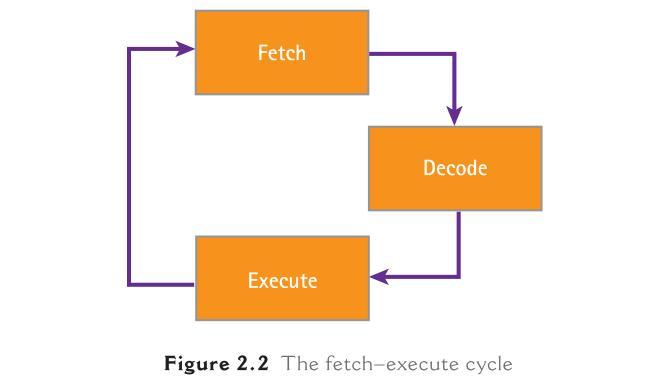
Describe the steps in the Fetch-decode-execute cycle. (5)
when the computer is switched on the CPU starts to perform its main function, running an endless fetch–execute cycle.
The programs that the CPU needs to process are stored in the main memory. The CPU simply fetches the next instruction it needs to process, decodes it and executes it before repeating the process.
Give the definition of a software.
Programs, a set of instructions to perform a task, in general are known as software.
Descibe a low-level language.
Assembly language
This is also a low-level language.
● As with machine language, each instruction causes just one processor
operation.
● Assembly language uses mnemonics to represent instructions.
In machine code, a programmer might write:
000010 00000 00000 00000 10000 000000
Describe a high-level langauge.
High-level languages do not have the same one-to-one correspondence between commands and machine code instructions as assembler.
A high-level language command may represent several machine code instructions:
● In a high-level language we can usually multiply two numbers together in one command.
● At machine level this is not possible and it has to be done by repeated addition.
High-level commands have to be turned into the binary instructions the machine can understand; this process is called translation.
There are two basic ways of translating high-level code to machine code:
● Compiler: converts the whole code into machine code before running it
● Interpreter: converts the code one instruction at a time, running each
instruction before translating the next.
Source code is the code written by the programmer.
A compiler translates this source code into an object code in machine
language. Object code runs independently of the source code and
translator.
An interpreter does not create object code and the source code must be
translated each time it is run. This means interpreted languages need the
source code and translator present every time the code is run.
What are the main advantages of a high-level language over a low-level
language?
High-level code uses words; machine code is in binary; high-level code is designed to be read by human programmers; high-level code is portable and can be translated for different machines; machine code is specific to a particular machine.
Compare an interpreter and a compiler for use by a student learning to program.
An interpreter translates and executes one line at a time whereas a compiler translates the whole source code; errors are identified one command at a time making it easier to debug the code whereas a compiler reports all the errors in the code at once making them hard to locate and debug; execution can be resumed once an error is identified whereas with a compiler the code must be modified and recompiled before it can be run; code can be developed and tested in stages whereas with a compiler the code needs to be compiled, executed each time the code is modified.
What are the advantages of compiling code for commercial distribution?
- *Compiled code** runs quickly once compiled; it does not need the translator to be present when running, reducing memory requirements; compiled code is difficult for others to modify,
- *without access to the source code**.
Discuss the need for both high and low level language. (6)
high level
- portable
- problem-oriented
- close to English
- one-to-many relationship
- easier to debug/change/update
- needs compiler/interpreter
low level
- machine-oriented
- can be difficult to read
- one-to-one relationship
- needs assembler
Alough source code written in High Level language is easier to debug and maintain than low level language, it executes more slowly and take up more space in memory than low level language.
Assembler translator
Advantages
Precise and direct instructions to the computer hardware
Disadvantages
Difficult to code Limited range of commands available
Compiler Translator
Advantages
- Compiler not needed on target machine
- Code runs quickly once compiled
- Difficult for others to modify without access to the source code
Disadvantages
- Initial compilation can be slow
- Errors are generated for all the code at once, making it difficult to debug
Interpreter
Advantages
- Executes one statement at a time so easy to debug
- Code can be developed and tested in stages
- Can be more portable since the code will run on any machine with an interpreter available
Disadvantages
- Interpreter needed on target machine
- The interpreter takes up space in memory
- Code executes more slowly
- Easy to modify since source code is provided
A user interface is a function of a typical operating system.
Write down four other functions of a typical operating system.
Any four functions from:
– file management/delete/copy/save/store/load files
– controls/manages software/hardware
– memory management
– I/O control
– error messages/handling
– security issues
– logging on/off
– accounting/user account management
– time slicing
– multi access
– multi tasking/task management
– JCL/job control/batch processing
– network management [4]
You have been asked to write a report on the use of the following communication methods:
- mobile phones
- video conferencing
- emails
Describe a benefit and a drawback of each of the above communication methods.
mobile phones
mobile phones
benefit:
– wireless system (so can be used anywhere)
– small, portable device/always with you
– instantaneous (e.g. take photo and immediately transfer file)
– can leave messages if recipient not available
drawback:
– contracts tend to be expensive
– phone calls overseas are very expensive
– out of signal
– battery life poor
– data transfer rate can be slow
– not very large memories
– small screens/keyboards make it more difficult to type/navigate
video conferencing
benefit:
– many people can take part in conference across the world
– can see all delegates on screen (and also talk in synchronised way)
– relatively inexpensive since uses Internet for communications
– can hold meeting of several people at short notice
– no need to pay for travelling/hotels/meeting rooms
– less time wasted travelling to meetings overseas/staff not out of office
– safer – recent increased risk of terrorist attacks
drawback:
– equipment is expensive to buy initially
– quality of sound/picture can be poor (poor reception)
– problems with time zones
– fast internet connection required
emails:
benefit:
– can send at any time/recipient can open any time
– inexpensive (same cost worldwide)
– can send large multimedia files
– no need for expensive equipment
– can send to multiple recipients
– can use attachment facility
drawback:
– if recipient doesn’t have correct software, can’t open attachments
– possibility of virus infections/phishing from attachments
– need Internet connection/ISP
– may not get immediate response (ONLY IF REVERSE NOT GIVEN UNDER BENEFIT)
Explain, with examples where appropriate, the following computer term.
Interrupt
- a signal/request generated by a device/program
- causes a break in execution of a program/stops the program
- e.g printer out paper, pressing break key
Explain the term ‘byte’
- fixed number of bits/8 bits
- represents a character
- unit of memory/storage
e/g 11010001
Explain the term CD-ROM
- (secondary/portable) storage medium
- can be read only (memory)
- cannot change data
e.g. used to store programs/data/picutres/films, etc
Explain the term ‘buffer’
- temporary store/memory
- allows speed of CPU/devices to be matched
- to hold data being transferred between peripherals and CPU
e.g pages stored waiting to be printed
A temporary storage area in memory, essential as storage devices run much more slowly than the CPU and data needs to be stored in memory before it is actually needed.
Explain the term ‘Optical media’
Any two points from:
- type of non-magnetic memory
- uses light sensitive surface to store data
- media are very portable
- can be write once or write many times
- used to store large files
- can be ROM or RAM
expample CD, DVD
Why does a computer have both ROM and RAM? (2 marks)
- *ROM** is needed for the initial settings and boot sequence;
- *RAM** is needed to store data and programs in use.
What is in RAM when the computer is working? (3 marks)
Operating system; programs; data in use by programs
Input Device and Reason for choice of device.
- Virtual reality application
- Disabled person communicating with a computer system
- Automatic stock control system at a supermarket
- Information kiosk at an airport using a GUI interface
- Control of a remote airborne camera drone
- Access to a secure building based on someone’s security clearance level
- Virtual reality application
Input Device: data gloves, data goggles ( allow user to interact with vr system directly)
sensor suits (system needs to get data directly from its surroundings
- Disabled person communicating with a computer system
Input Device: microphone - allows blind person to dictate text directly to the computer
head wand - if little hand movements, allows user to select options from the screen
large keyboard - people with poor eye sight can use the keyboard to input text
- Automatic stock control system at a supermarket
Input Device: barcode reader - automatically reads data
RFID tag reader - fewer data entry errors
- Information kiosk at an airport using a GUI interface
Input Device: touch screen, trackerball - easier for the customers, reduces the number of possible options for the user, selection options from a screen, immovable/more secure
- Control of a remote airborne camera drone
Input Device: Joystick - provide fine control
- Access to a secure building based on someone’s security clearance level
Input Device: Biometric - based on unique code ??



