MHS
Message handling system: used worldwide.
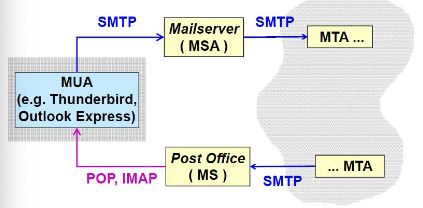
MUA (Message User Agent): SW used by user to send mail.
MSA (Message Submission Agent): SW module with task of injecting the mail into the transport system.
MTA (Message Transfer Agent): the mail transport system is composed of MTAs arranged in a chain. The mail is given to the next MTA until it reaches destination.
Upon reaching destination, the email will be stored in the MS (Message Store).
Receiver will read the mail using MUA when they want. After replying, the reverse MSA will be different than the sending MSA, MTA chain will be different.
Email client-server mode
User has a program that has configured to have mail server or outgoing mail server. It uses SMTP to send mail, the user can close the program and the mail will be submitted, but it does not mean it will be received.
When someone sends a message, it will be injected in the MTA chain and finally be stored in the Post Office (MS, incoming mail server).
When a user wants to read mail, it asks the MS for incoming messages, the user can choose to leave a copy on the server or delete them. For security it’s better to delete, but Post Offices could have illegal copies.
Webmail
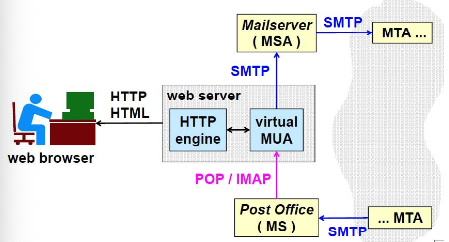
MUA is replaced by a web-browser. A virtual MUA is placed inside the web-server, that is automatically configured. An HTTP engine is placed in front of the MUA.
Not good for privacy.
Mail protocols, ports, formats
- SMTP (Simple Mail Transfer Protocol)
- 25/TCP (MTA)
- 587/TCP (MSA)
- POP (Post Office Protocol)
- 110/TCP
- IMAP (Internet Message Access Protocol)
- 143/TCP
- Formats:
- RFC-822: Message format (pure text body)
- MIME: Multimedia extension of RFC-822
RFC-822 Messages
Provides pure test mail with only US-ASCII characters on 7 bits (8th used for parity).
Lines must be terminated by (system independentness)
Messages composed of:
- Header:
- keywords at the begginning of the line
- Continuation lines start with a space
- Body
- Separated from the header by an empty line
- Contains message
*
RFC-822 header
Written in english.
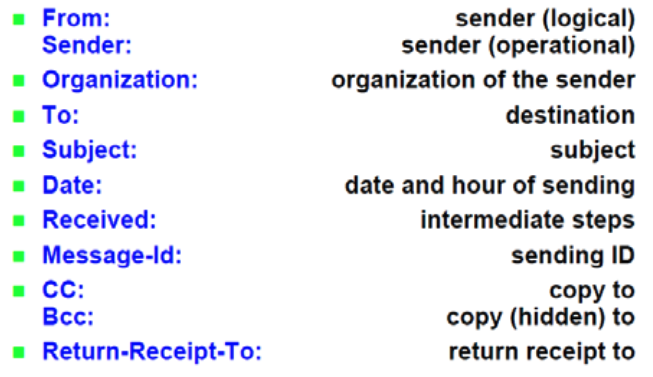
From: logical sender, some applications allow changing it to an arbitrary value.
Sender: operational sender, usually is the same as From
Date is the time declared by the MUA, easy to forge
Received: contains list of MTAs traversed.
CC: carbon copies.
BCC: blind carbon copies
Return-Receipt-to: when the sender would like to receive an ack.
Issues in securing e-mail
- E-mail is connectionless, TLS won’t solve the problem
- Untrusted MTA’s
- Security of MS, where messages are stored.
- Mailing-list encryption:
- public key of destination is needed
- A lot of mails as recipient makes it hard to send encrypted mails.
- Compatibility with already installed SW
- Solution developed:
- lnternet: PGP, PEM, MOSS, S/MIME
- OSI: X.400
- Only survivors are PGP and S/MIME.
Mail spamming
- UBE or UCE (Unsolicited Bulk/Commercial E-mail)
- Used to sent unwanted messages: unauthorized advertisement, attacks (malware, phishing, …)
- Nearly 50% of all e-mail.
- Good mail is ham, not spam.
Spamming strategies
- Spammer hides real sender, but uses a valid one, so the recipient believes they can trust it.
- Spammer sends spam via special MTA named Open Mail Relay
- not well configured, such that they accept and forward email from anybody.
- Spammers also use zombies or botnets witi a variable phantom IP address (unassgigned)
- Content obfuscation:
- Deliberate Mistakes (Vi@gra)
- Image rather than text (not detectable)
- Bayesian poisoning: insert text from a book at the end of the mail, so that the systems cannot detect different frequency patterns
- Inside an error message: spammers send fake error messages in the hope that they are not checked from antispamming software.
(Open) mail relay
Usually, where there is a domain, there’s also a domain relay.
Configured to accept outgoing mail only if they come from the same domain (e.g. polito.it). Accepts incoming mail only if final destination is the same domain (e.g. polito.it). This is the configuration of a not-open relay.
If the systems is misconfigured or restrictions are not applied, an external user can ask the relay to send email to the outside, the user might be a spammer. For this reason, the relay must distinguish from real from fake users.
Anti-spam for MSA
Restrict use of MSA to authorized users, which must be authenticated.
To authenticate users it is possible to use:
- IP address of the MUA:
- problem with mobile nodes, IP spoofing and malware installed in valid node
- Value of the field From
- ca be easily tricked with a fake mail
- SMTP authentication
- The most secure
Strategies:
- Reject or accept mail from an MTA after checking a blacklist or whitelist. Check DNSBL (DNS-based blacklist) which works like this:
- a request from MTA is received, the address is checked using nslookup -q=DOMAIN.dnsbl.antispam.net
- if NXDOMAIN == “no such domain” then it is not a spammer
- else the query returns an address: 127.0.0.X (X is a code providing the reason for the blacklisting) and a TXT record with more info.
- Instead of looking at the MTA, that is changed frequently by attackers, another strategy consists in looking up addresses contained in the text of the mail. If a message contains a URI (for phishing), then a look up is performed on DNSBL (URI reputation data). Some honeypots are placed just for capturing phising URIs.
DNSBL lists
There is a number of free/commercial/anonymous listS.
Lists are managed by people that are not easy to be contacted, thus URIs inserted are not easy to be removed. Configuring the MTA correctly is strongly suggested.
Activate/use the abuse@domain address as required by an RFC.
Anti-sapm for incoming MTA
- Greylisting: since spammers are sending millions of messages, they have scarce time; they would like to send the message as soon as possible.
- when someone is contacted by an MTA a temporary error is given, if the MTA comes back in some time them it will be accepted. A spammer would usually skip those. This will delay also ham. Server will need to keep a history of contacts.
- Nolisting: if greylisting is not possible.
- If more than one mail exchanger is defined for target domain is defined, typically spammers contact the mail exchanges that has got the highest prioroity.
- If we list at least 3 mail exchangers: first and last don’t answer. Then spammer will only try either the first or the last.
- Problem: this will delay ham.
DKIM
DomainKeys Identified Mail: strategy in which the sender uses a signature to guarantee:
- the identity of the sender
- partial integrity of the message
- Done through a digital signature, created by the MSA or outgoing MTA.
- Signature covers some headers and part of the body and it is verifying through a public key (tipycally insterted by DNS)
- Every mail sent from the mail relay of Polito mail server contains a signature where the Polito MTA says “This was sent by me and I have authenticated the user”.
- Thanks to it we can discard messages with a fake sender and hence support anti-spam and anti-phishing.
SPF
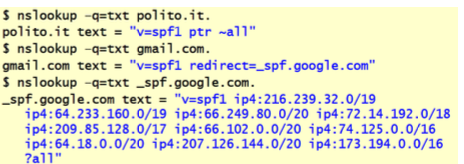
Sender Policy Framework: techniques that consists in declareing which are the outgoin MTA via specific DNS records.
Performing an nslookup on polito.it returns ‘v=spf1 ptr ~all’, which means that any node inside Polito that has a valid reverse address (for which a PTR record exists) is a valid sender of electronic mail, all means that everything should be accepted.
Performing an nslookup on google, gives us the address where to find the exact list of nodes that are outgoing mail servers for google. A mail coming from a google user could be rejected if it not coming from one of those servers.
ESMTP
Extended SMTP: protocol and communication channel. ESMTP client must identify themselves to communicating parites with EHLO hostname.
If the receiving party speaks ESMTP must declare the extensions it supports one per line and its response to EHLO.
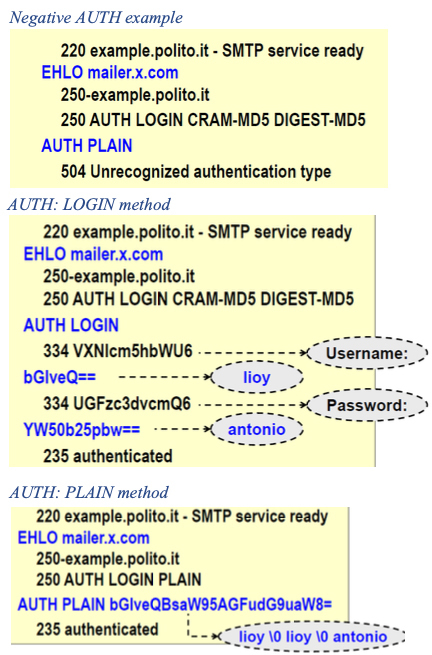
Extensions are needed to authenticate the client before accepting messages from it. Useful against spamming because after the EHLO command, the server sends the authentication mechanism supported and the client chooses one and the authentication protocol is executed. If the authentication fails, the communication channel is closed.
ESMTP AUTH examples
ESMPT AUTH challenge-response methods
There are other methods than LOGIN and PLAIN (both sending cleartext passwords).
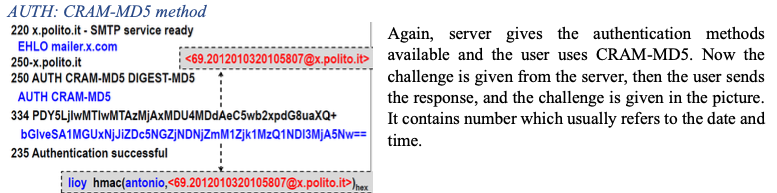
CRAM-MD5 and DIGEST-MD5 are symmetric challenge response methods.
CRAM-MD5
- Challenge = base64(nonce)
- Response = base64(usr SPACE HMAC-MD5(pwd, nonce)lowercase hex)
DIGEST-MD5
- Similar to HTTP/1.1 digest authentication
- Declared obsolete in 2011, replaced with SCRAM
Analysis of CRAM-MD5
Pros:
- Allows client authentication
- Resistant to replay (challenge = random number + timestamp + FullyQualifiedDomainName)
- Resistant to sniffing (non-invertible hash)
Cons:
- No server authentication (but if used over TLS that could provide server authn)
- Cleartext storage of password, unless the intermediate steps of HMAC are stored.
- Dictionary attack is possible
- Possible MITM attack after authentication. Problem of any authentication performed only at the opening of the channel, and where there is no integrity for each message.
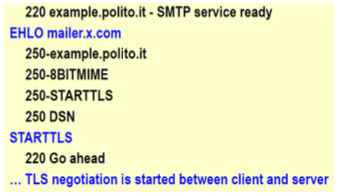
SMTP Protection with TLS
STARTTLS = option for EHLO and command
If negotiation is successful, the protocol status is reset, it starts again from EHLO and the supported extensions can differ.
If the negotiation produces a security level below the threshold:
- The client sends immediately QUIT and closes the connection
- The server respons to each command with code 554 (refused due to low sercurity), since in SMTP the connection must always be terminated by the client.
Security services for e-mail
When 2 MTAs are communicating, it is not important to have a TLS channel, because email is cleartext anyway. Email is hop-by-hop service, email messages must be protected.
- Integrity (without direct communication)
- Authentication (identify the sender)
- Non-repudiation (sender cannot deny having sent the mail)
- Confidentiality (optional): messages are not readable both in transit and when stored in the mailbox.
Main ideas of email security
- No modification to the standard MTA:
- result of signing operation or message encryption must be encoded to avoid problems when passing through gateways.
- No modification to the present UA
- With modification to the present UA: improving the UI
- Symmetric Algorithms: encryption of messages, with message key.
- Asymmetric algorithms: to encrypt and exchange symmetric keys, and for digital signatures.
- Use of public key certificates for non repudiation.
If all of the above is well-done, message security is only based on the UA of the recipient, not on the security of MTA (untrusted).
Types of secure messages
- Clear-signed: in-clear message (anybody can read it) + digital signature (as attachment or inside the message)
- verifiable only from owners of secure MUAs
- Risky if the text-part is not well-encoded, the most significant bit of each byte could be cleared for parity by any MTA, this could cause a signature mismatch even with a correct message.
- Signed: message + digital signature encoded togheter (e.g. base64)
- only secure MUAs can verify signature
- Encrypted/enveloped: encrypted message + encrypted keys encoded
- only who owns secure MUAs and has the keys can decrypt the message
- Signed and enveloped
Steps for secure message creation
- Transform message into canonical form (System independent)
- MIC (Message Integrity Code): integrity and authentication
- Typically message + E(priv. Key, hash(message))
- Encryption: confidentiality
- Typically: E(MessageKey, message) + E(Pub Key Receiver, MessageKey)
- Encoding: to avoid modification by the MTA
- Typically base64, uuencode, binhex



