- How do you quickly jump to the last row?
- How do you quickly jump to the first row?
- How do you quickly jump to the first column?
- How do you quickly jump to the last column?
- Double click the bottom edge of a cell
- Double click the top edge of a cell
- Double click the left edge of a cell
- Double click the right edge of a cell
How do you quickly find cells with only numerical or only text values?
On the Home ribbon tab, go to Find & Select > Go To Special… > select Constants > uncheck all options except Numbers and Excel will only select the cells with numbers (no text or formulas)
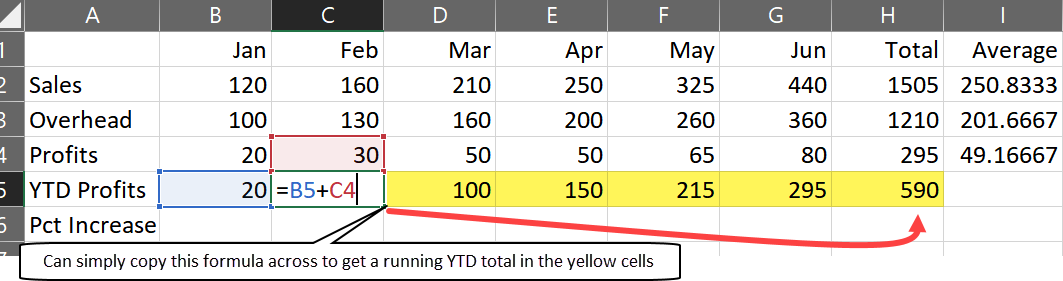
How do you create a Year To Date total using a formula?
- Create a row or column to hold your YTD data
- Input the first value in the YTD, which will be the same as the first total
- Create a formula that adds the ‘new total’ to the total you created in step 2
- Drag this formula across the remaining rows. As long as you used relative cell references, Excel will iteratively calculate a recursively increasing YTD total for each new column as shown in the example below
What is the difference between the COUNT and COUNTA functions?
COUNT only counts all cells with numeric values - either numbers or dates
COUNTA counts all cells with data (alpha or numbers or dates)
How can you add Trending Arrow ‘Stoplights’?
Home ribbon > Conditional Formatting > Icon Sets > 3 Arrows (Colored)
- What is the prerequisite for using Slicers?
- How do you insert a Slicer?
- How do you select multiple values in a slicer window?
- True or false - you can add multiple Slicers at once for multiple dimensions?
- What are Slicers?
- Your data must be formatted as a Table first
- Table Design ribbon tab > Insert Slicer
- Hold down the Ctrl key and click the desired values
- True
- Pretty filters on steriods
How do you insert data in cells without altering the data in adjacent rows or columns?
- Select a cell or range of cells that you want to insert data into
- Right click
- Insert…
You will be prompted if you want to shift cells to the down or right.
How do you delete cells without altering the data in adjacent rows or columns?
- Select a cell or range of cells you want to delete
- Right click
- Delete…
You will then be prompted to shift the remaining cells to the left or up.
How do you quickly Move, Copy, and Move & Insert data from one location to another using the mouse?
- Move > Mouse Drag the edge of any cell (after selecting cells)
- Copy > Ctrl + Mouse Drag the edge of any cell (after selecting cells)
- Move & Insert > Shift + Mouse Drag the edge of any cell (after selecting cells)
Note that both formulas and formatting are retained when copying or inserting data this way
- What is the name of the feature that allows you to show the same dataset with multiple, independent scrollbars?
- How do you invoke this feature?
- What is a use case for this feature?
- Split View
- Go to the View tab and click Split - where your mouse is determines how the data is split (and whether it is split horizontally, veritically, or both).
- If you wanted to view the Total or Subtotal formula line at the end of the spreadsheet to see how it updates in real time when you update data much earlier near the beginning of a column with a lot of rows of data.
- What is the name of the feature in Excel where Excel can automatically summarize tota into groupings?
- What is a prerequisite for this feature?
- What are three really good use case examples for this feature?
- Describe the steps to invoke this feature.
- Auto Outline
- Your data should have totals or subtotals so Excel can understand the data’s heirarchy
- Balance Sheets or Profit & Loss Statements, Budgets
- Data ribbon tab > Outline > Group > Auto Outline
- What is the name of the function that automatically shows all active Excel Workbooks (files) into a single screen (and automatically sizes them)?
- Where can the button for this feature be found?
- Arrange All
- In the Vew tab
- What is the name of the feature that allows you to see multiple Worksheet tabs on an Excel file at the same time?
- Where do you go to invoke this feature?
- The Windows feature
- View tab > New Window
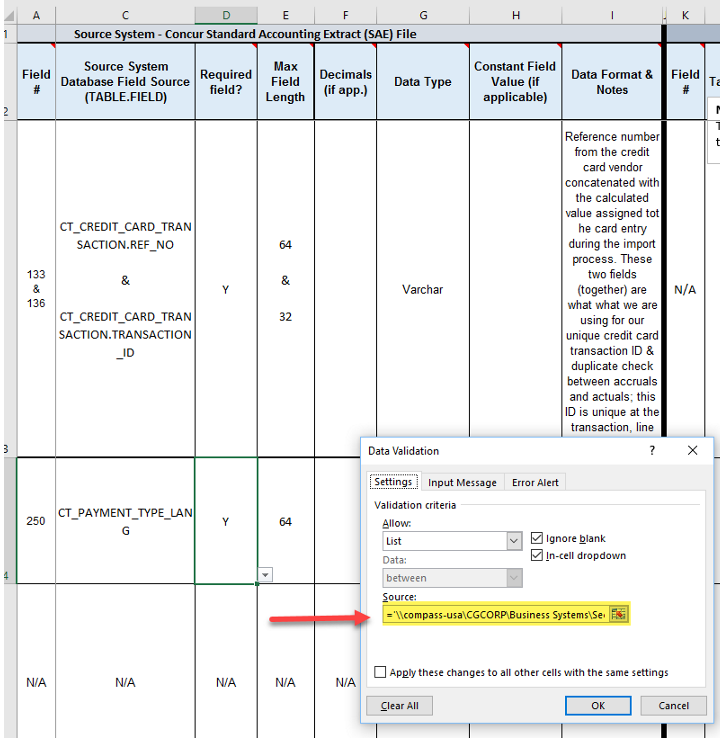
- What is a common cause of the ‘External Links in Worksheet’ warning?
- How do you find and remove this link to stop the message from ever coming up again?
- Data Validation rules that reference some external file path & filename that no longer exists
- File > Info > Check for Issues > Check Compatibility > Copy to New Sheet > Ctrl + F to search for data validation > click on the items - if you see any with the Source field populated with external file references > click Clear All to get rid of the external link
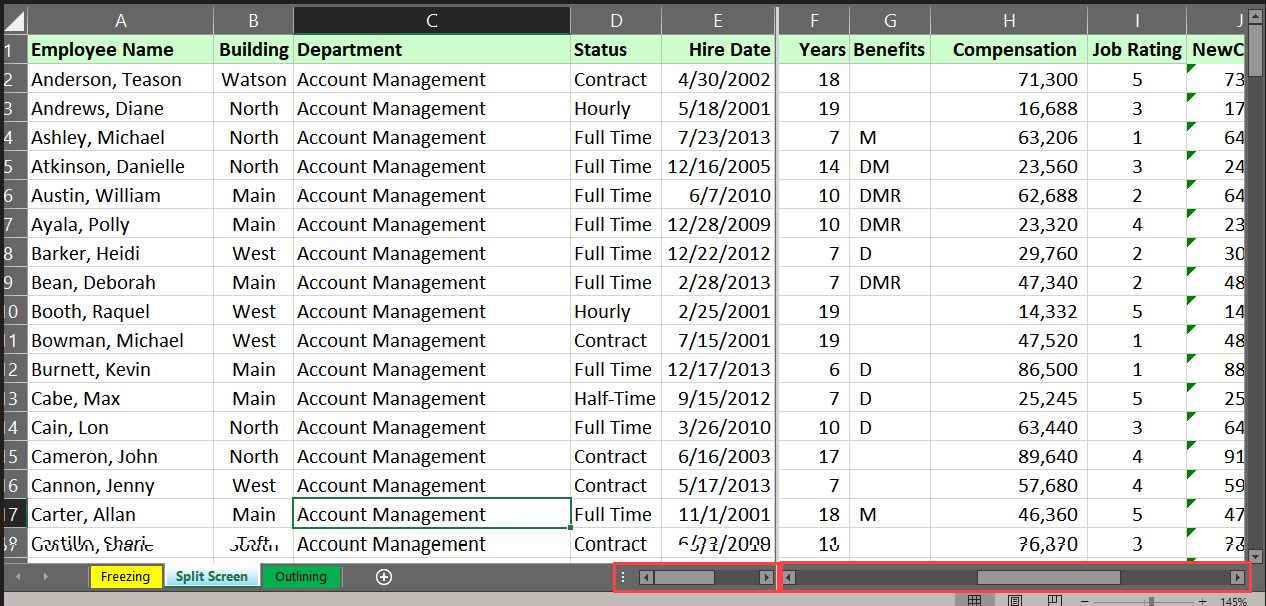
- How can you show the same data set with multiple, independent scrollbars in the same worsheet & window?
- What is the best practice when using this feature?
- Why would this be useful?
- How do you invoke this feature?
- Split View
- You should only split either verticially or horizontally - never both
- If you have data at the far bottom or far right of the dataset with a formula and you want to see how the calculated figure gets updated as you manipulate the source data
- Place your cursor to select an entire row or column you would like to split at > View ribbon tab > Split button
- Why would you ever use an approximate match option in VLOOKUP or XLOOKUP?
- What is a limitation of this feature with VLOOKUP?
- When are exact matches useful?
- What is the best way to avoid h aving to use absolute cell references when using VLOOKUP or XLOOKUP?
- If the lookup value is a number and you are searching for a ‘corresponding number’ to the right of the ‘search number’ based on numerical thresholds or ‘buckets’.
For example, if you had a pricing list of commission rates based on dollar thresholds and you wanted to get the corresponding rate for each number in your dataset.
- If you use an absolute reference in a table array, the data in the first column must be sorted in ascending order.
- If the lookup value is a text or ID - think of this as a database or column join or lookup
- Use entire column references (e.g. A:A or K:L)
1) By default, are cells Locked or Unlocked in Excel?
2) What is required to start locking down or protecting cells?
3) Where do you go to protect cells within a worksheet?
4) How do you password protect an entire workbook (file)?
5) How do you hide/protect worksheet tabs?
1) Locked
2) You must first unlock all the cells in the worksheet.
3) Review > Protect Sheet
4) File > Save As > Tools > General Options
5) First, hide any worksheets you want to hide, then Review > Protect Workbook (structure). This prevents anyone from unhiding or doing anything with other worksheets you don’t want them to.



