1
Q
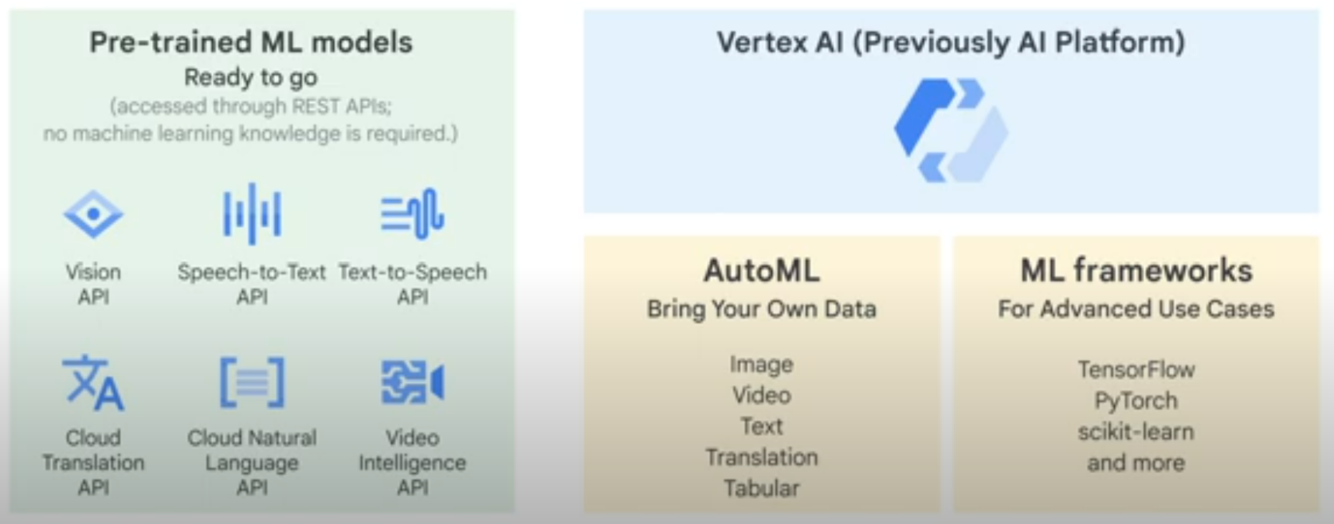
Pre-trained ML models (Ready to go)
Accessed through REST APIs, no machine learning knowledge is required
- Sight
- Vision: Image recognition/analysis
- Video: Video analysis, labels, shot changes, explicit content
- Language
- Translation: Dynamically detect and translate between languages.
- Natural Language: Text analysis, extract information, understand sentiment
- 3 Modes: Sentiment Analysis, Entities, Syntax
- Conversation
- Dialogflow: Build virtual agents and other conversational experiences
- Cloud Text-to-Speech API: Convert text to audio, multiple languages/voices, natural sounding synthesis
- Cloud Speech-to-Text API: Convert audio to text, multi-lingual support, understand sentence structure
- Structured Data
- AutoML Tables: Automatically build and deploy state-of-the-art machine learning models on structured data.
- Recommendation AI: Deliver highly personalized product recommendations at scale.
- Cloud Inference API: Quickly run large-scale correlations over typed time-series datasets.
A
2
Q
AutoML
- Suite of ML products
- Facilitates training of custom ML models
- Pre-trained APIs but for custom models
- Example: Identify specific geographical features
- Supply your own data to train on
- Pre-trained APIs but for custom models
- Serving models through the AutoML API
- Currently available for:
- Vision
- Video
- Translation
- Natural Language
- Structured Data - AutoML tables
A
3
Q
Evaluating Models on AutoML Vision
While iterating on your model, if the model’s quality levels are not up to expectations, you can go back to earlier steps to improve quality:
- AutoML Vision allows you to sort the images by how “confused” the model is, by the true label and its predicted label. Look through these images and make sure they’re labeled correctly.
- Consider adding more images to any labels with low quality.
- You may need to add different types of images (e.g. wider angle, higher or lower resolution, different points of view).
- Consider removing labels altogether if you don’t have enough training images.
- Remember that machines can’t read your label name; it’s just a random string of letters to them. If you have one label that says “door” and another that says “door_with_knob” the machine has no way of figuring out the nuance other than the images you provide it.
- Augment your data with more examples of true positives and negatives. Especially important examples are the ones that are close to the decision boundary (i.e. likely to produce confusion, but still correctly labeled).
- Specify your own TRAIN, TEST, VALIDATION split. The tool randomly assigns images, but near-duplicates may end up in TRAIN and VALIDATION which could lead to overfitting and then poor performance on the TEST set.
A

Google Cloud Professional Data Engineer
flashcards
Decks in class (16)
# Cards
-
0_GCP Fundamentals15
-
1_Data Processing fundamentals6
-
2_Storage and Databases17
-
3_Pub/Sub11
-
4_Dataflow20
-
5_Dataproc13
-
6_Bigtable17
-
7_BigQuery30
-
8_Cloud Datalab3
-
9_Cloud Datastudio4
-
10_Cloud Composer4
-
11_Machine Learning19
-
12_Vertex AI16
-
13_Pretrained ML API's3
-
14_Operationalizing Machine Learning4
-
15_Dataprep3



